How I built a complete AI platform (custom C89 inference engine, BPE tokenizer, AltiVec SIMD optimization, and a Python export pipeline) that runs GPT-2, TinyLlama, Qwen, and any HuggingFace model on a 2002 PowerBook G4.
| Repository | Forum | Blog | MacinAI | About | Login | Register |
How I built a complete AI platform (custom C89 inference engine, BPE tokenizer, AltiVec SIMD optimization, and a Python export pipeline) that runs GPT-2, TinyLlama, Qwen, and any HuggingFace model on a 2002 PowerBook G4.
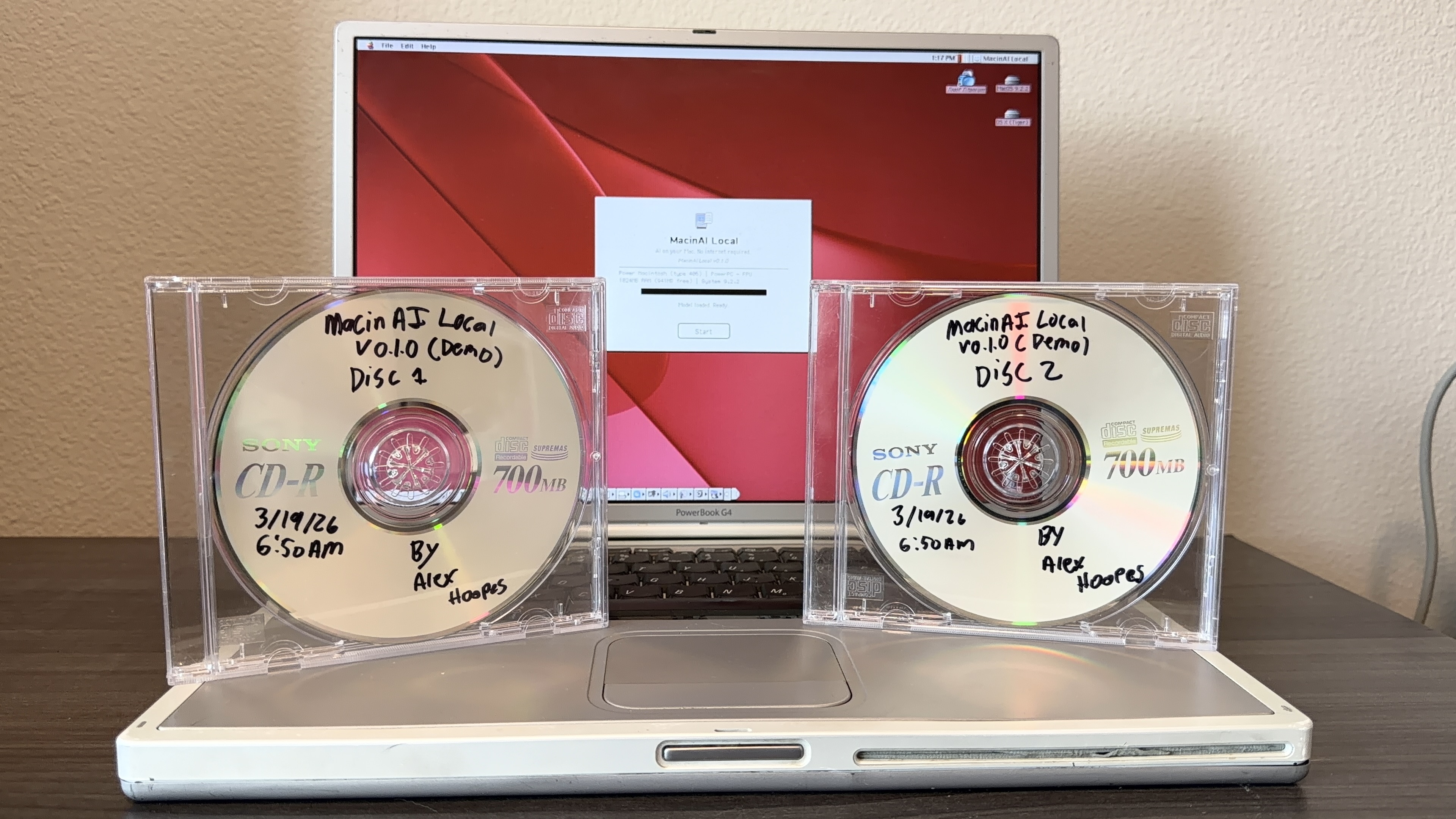
There's a PowerBook G4 Titanium on my desk right now. It has a 1GHz PowerPC G4 processor, 1GB of DDR266 RAM, and Mac OS 9.2.2.
I chose this machine for a few reasons: it was released in 2002, the year I was born, its titanium design still looks like it could be a modern MacBook, and it's the last laptop Apple ever made that boots Classic Mac OS, while being the fastest one at that.
Next to it, two demo CDs with Sharpie labels. Those discs contain a fully local AI assistant and 4 compatible models. No internet, no cloud, no relay server. Just a custom inference engine doing transformer math directly on 23-year-old hardware.
This is MacinAI Local. I've been building it for months, and today I'm sharing it.
MacinAI Local didn't start as its own project, hence the local addition to the name. It started with the original MacinAI, an internet-connected AI chat client I built for classic Macs.
The original MacinAI connects to a relay server over TCP via Open Transport. The Mac sends your message to a Python Flask server I host (free of charge), which forwards it to OpenAI's GPT-4o-mini API and pipes the response back. There's a lot more to it to enable agentic capabilities, but that's the gist of it. It's a full-featured chat experience on System 7.5.3+ hardware: Geneva-font chat interface, conversation history, a sidebar, system catalog indexing so the AI knows what apps and files you have installed and can interact with them, the list goes on. GPT-4o-mini behind it means billions of parameters, broad world knowledge, strong reasoning. I'm also in the process of fine-tuning a Qwen 2.5 Coder 14B model that will give it deep Macintosh-specific knowledge running on my own hardware. Once I can nail everything down with that, I think MacinAI will be a great program.
When I first shared MacinAI online, the reaction was... mixed. A lot of people were dismissive. "It's not real AI running on the computer." "It's just a relay." "You're just calling an API." I understood the criticism, honestly. The Mac is essentially a thin client in that setup, the intelligence lives on a server somewhere else. I knew that if I tried to run a real LLM locally on that hardware, the generation speed would be painfully slow compared to an API response. I also thought it would be impossible to get coherent responses.
But knowing something is slow and knowing it's impossible are two different things. The comments stuck with me. I wanted to know: could any classic Macintosh actually run a real language model? Not just the G4 with its AltiVec unit, but a 68040, a 68030, maybe even a 68000. Not as a product plan, just as an experiment to see what the hardware could do.
I wrote a quick scalar matmul benchmark in CodeWarrior. The numbers were slow but not impossible. I wrote a forward pass stub. I tried AltiVec. The numbers got better. I kept going.
What started as "let me see how fast I can generate one token" turned into a complete inference engine, then a tokenizer, then a model export pipeline, then a training pipeline, then an installer, then a full application. MacinAI Local became its own thing. The internet version gives you GPT-4o-mini's full capability on 1990s hardware. The local version gives you a smaller, specialized brain that lives entirely on the machine, needs nothing external, and can actually do things on your Mac through AppleScript. It's not a replacement, it's a complement. And yeah, it's slower than an API call, but I wanted to prove it was possible. On a G4 you get between 1 and 3 tokens per second depending on the model. On older hardware you're waiting much longer, but every single token is computed right there on that vintage processor. No server. No internet. No one can tell you it's not real AI running on the computer, because it is.
To put the performance gap in perspective: the PowerBook G4's AltiVec unit peaks at around 8 GFLOPS. The RTX 3080 Ti I trained the custom model on does 34 TFLOPS. That's over 4,000x more raw compute, and that's just a consumer GPU, not even datacenter hardware. The fact that it works at all, and produces coherent multi-sentence responses with AppleScript automation at nearly 3 tokens per second, is what made this worth building. It also proved to me that the internet-connected MacinAI is the right architecture for real daily use on vintage hardware. You get the best of both worlds: GPT-4o-mini quality at instant response times over the relay, and a fully self-contained local option when you want the machine to stand on its own.
They share DNA: the chat UI code, the conversation format and code, the Gestalt-based hardware detection, but they solve different problems. MacinAI is "bring modern AI to your vintage Mac." MacinAI Local is "make your vintage Mac intelligent on its own."
MacinAI Local is a complete LLM inference platform for classic Macintosh hardware. Not a toy demo. A platform. It consists of three main parts:
A custom C89 inference engine written from scratch for CodeWarrior Pro 5, targeting the Mac Toolbox APIs. It handles model loading, arena memory allocation, disk paging, tokenization, and the full transformer forward pass.
A Python export pipeline that converts any HuggingFace-compatible model into a custom .bin format the C89 engine can load. I've tested it with GPT-2 (124M parameters), TinyLlama (1B), Qwen 0.5B, SmolLM, and a custom 100M-parameter model trained on Macintosh-specific documentation.
A native Mac OS client application with a chat interface, Speech Manager integration (it speaks every response aloud using PlainTalk voices), conversation persistence, settings management, and AppleScript automation. The model can generate scripts to launch apps, manage files, and control the system.
It runs on anything from Mac OS 9 down to System 7.5.3, on hardware ranging from a PowerBook G4 to a 68040 Macintosh from 1993.
All of these models have been tested on real PowerBook G4 hardware (1GHz, 1GB RAM, Mac OS 9.2):
| Model | Params | Q8 Size | Speed (G4) | Notes |
| MacinAI Tool v7 | 94M | 107 MB | 2.66 tok/s | Custom tool model, AppleScript |
| GPT-2 | 124M | 141 MB | 1.45 tok/s | Text completion |
| SmolLM 360M | 360M | 394 MB | 0.85 tok/s | Chat model |
| Qwen 2.5 0.5B | 494M | 532 MB | 0.63 tok/s | Best quality (in 1GB RAM) |
| TinyLlama 1.1B | 1.1B | 1.18 GB | 0.10 tok/s | Disk paging, 9.9s per token |
Every "AI on retro hardware" project I've found does the same thing: port Karpathy's llama2.c and run a single 260K-parameter model that generates children's stories. EXO Labs did it on Windows 98 and got covered by Tom's Hardware and a shoutout from Marc Andreessen. Someone did it on a Commodore 64. Someone did it on DOS. It's the same project repeated across platforms.
MacinAI Local is different in a few important ways.
It's model-agnostic. The engine supports two architecture families: LLaMA-family (RMSNorm, SwiGLU, RoPE) and GPT-2-family (LayerNorm, GeLU, learned positional embeddings), which covers the vast majority of open-source models. A Python script converts any HuggingFace model into the custom .bin format. You're not stuck with one toy model.
It runs real models at real sizes. TinyLlama 1B runs with disk paging (slow, but it works). Qwen 0.5B runs comfortably. The custom Macintosh model is 100M parameters. These aren't 260K-parameter demos. They produce actual coherent responses.
It does useful things. The model generates AppleScript to automate Mac OS tasks. Ask it to copy a file, empty the trash, launch an application, or eject a CD, and it writes the script, shows you a confirmation dialog, and executes it via the Open Scripting Architecture. It's a text-activated Macintosh automation tool, not just a chatbot.
It was built from scratch. No llama.cpp port. No llama2.c derivative. Every line of the inference engine, the tokenizer, the memory allocator, the forward pass, the SIMD optimization, all written in C89 for CodeWarrior Pro 5, targeting Mac Toolbox APIs directly.
Everything starts with the model file. The custom .bin format has a fixed 128-byte header that tells the engine everything it needs to know:
typedef struct {
    long    magic;          /* 'MCAI' = 0x4D434149 */
    long    version;        /* Format version (1) */
    long    numLayers;      /* e.g., 18 transformer layers */
    long    hiddenDim;      /* e.g., 640 */
    long    numHeads;       /* e.g., 10 attention heads */
    long    numKVHeads;     /* For GQA support */
    long    headDim;        /* 64 (hiddenDim / numHeads) */
    long    ffnDim;         /* 1728 (SwiGLU intermediate) */
    long    vocabSize;      /* 8205 (8192 BPE + 13 special) */
    long    maxSeqLen;      /* 1024 */
    long    ropeTheta;      /* 10000 (0 for learned pos) */
    long    quantType;      /* 0=float32, 1=int8, 2=int4 */
    long    archType;       /* 0=LLaMA, 1=GPT-2 */
    long    chatTemplate;   /* 0=custom, 1=ChatML, 2=raw, 3=Zephyr */
    long    flags;          /* Bias flags, tied embeddings, etc. */
    /* ... offsets, sizes, reserved fields ... */
} ModelConfig;
All fields are 4-byte long to avoid 68K alignment issues. All multi-byte values are big-endian (native Motorola byte order). After the header comes the vocabulary section (token strings and BPE merge rules), then the weight tensors in a fixed order.
The archType field is the key to model-agnostic inference. When it's kArchLLaMA, the forward pass uses RMSNorm, SwiGLU with a 3-matrix FFN (gate, up, down projections), and rotary positional embeddings. When it's kArchGPT2, it uses LayerNorm with bias, GeLU with a 2-matrix FFN, and learned positional embeddings. Same engine, different code paths.
The Python export script handles the conversion: it reads any HuggingFace model, detects its architecture, quantizes the weights, and writes the .bin file with the appropriate header fields set.
Classic Mac OS memory management is... different. There's no virtual memory to speak of (Mac OS 9's VM implementation is rudimentary, can't even use it with 1GB physical RAM), the system heap is fragile, and the Memory Manager was designed in 1984 for a machine with 128KB of RAM. Calling malloc in a loop to allocate hundreds of megabytes of model weights would fragment the heap beyond recovery.
So I wrote an arena allocator. At startup, the engine requests one single contiguous memory block:
/* 88% of physical RAM, capped at 900MB, minimum 4MB */
arenaSize = (physicalRAM / 100L) * 88L;
if (arenaSize < 4L * 1024L * 1024L)
    arenaSize = 4L * 1024L * 1024L;
if (arenaSize > 900L * 1024L * 1024L)
    arenaSize = 900L * 1024L * 1024L;

/* Try TempNewHandle first (outside app partition),
   fall back to NewPtrSys, then NewPtr */
gArenaHandle = TempNewHandle(arenaSize + 16, &tempErr);
All subsequent allocations are bump-pointer increments from that base. No fragmentation. No individual frees. The arena holds the model weights, activation buffers, KV cache, and tokenizer tables. When you're done, you free the one block.
The 88% figure gives the engine as much RAM as possible while leaving room for the system heap and the application's own code. The allocation tries TempNewHandle first, which grabs memory from outside the application's partition (the OS's temporary memory pool), meaning it doesn't compete with the app's own heap. If that fails, it falls back to NewPtrSys (system heap), then NewPtr (app heap). On a 1GB PowerBook G4, this gives the engine about 900MB to work with.
All allocations are 16-byte aligned for AltiVec vector loads. On 68K machines without AltiVec, the alignment is still maintained but unused. It simplifies the codebase to have one allocation strategy.
The core of the engine is a standard LlamaForCausalLM forward pass, implemented in C89. Here's the structure:
For the 94M parameter model, this requires approximately 94.5 million multiply-accumulate operations per token: 29.5M for attention projections, 59.7M for FFN projections, and 5.3M for the language model head.
The GPT-2 code path substitutes LayerNorm for RMSNorm, GeLU for SwiGLU (2-matrix FFN instead of 3), and learned positional embeddings for RoPE. The architecture differences are handled by a switch on config.archType at each divergence point in the forward pass, but the overall structure is the same.
The scalar C89 baseline produces correct output at 2.4 seconds per token whih is usable, but barely. The PowerPC G4's AltiVec (Velocity Engine) unit processes 4 float32 values simultaneously in 128-bit vector registers. A single vec_madd instruction computes 4 multiply-accumulate operations in one cycle. The matrix-vector multiply dominates runtime, so vectorizing it is the obvious target.
The first attempt was a straightforward vectorization of the dot product:
for (j = 0; j < cols; j += 4) {
    vMat = vec_ld(0, row + j);
    vVec = vec_ld(0, vec + j);
    accumulator = vec_madd(vMat, vVec, accumulator);
}
out[i] = vec_horizontal_sum(accumulator);
This got 2.4× speedup instead of the theoretical 4× because of a serial dependency chain: each vec_madd writes to accumulator, and the next reads it. The G4's vec_madd has 4-cycle latency, so the pipeline stalls every iteration.
The vectorized engine worked perfectly on my SheepShaver emulator but produced all-zero output on real G4 hardware. Every token came back as 0.
Six hours of systematic debugging later, a NaN scan of the Q projection output revealed the cause:
FwdDiag: Q has NaN! count = 1
FwdDiag: Q first NaN at = 257
One element. Out of 640. Row 257 of the Q weight matrix produced NaN when multiplied using vec_madd on real G4 silicon. The emulator's JIT compiler running on modern x86 hardware doesn't reproduce this edge case. That single NaN propagated through the attention mechanism, the residual connection, all subsequent layers, and turned every logit to zero.
The fix: check for NaN after each dot product using IEEE 754's self-inequality property (NaN != NaN), and recompute the affected row with the proven-working scalar path:
out[i] = vec_horizontal_sum(accumulator);

/* NaN guard: real G4 vec_madd produces NaN for certain
   weight/activation combinations. Recompute with scalar. */
if (out[i] != out[i]) {
    volatile float sum = 0.0f;
    for (j = 0; j < cols; j++)
        sum += row[j] * vec[j];
    out[i] = sum;
}
Performance impact: one float comparison per row. Typically 1 out of 640 rows triggers the fallback. 0.15% overhead for correct output on real hardware.
To break the dependency chain, I used 4 independent accumulators so the G4 can issue vec_madd instructions on consecutive cycles:
for (j = 0; j < cols; j += 16) {
    vec_dstt(row + j + 32, 0x00040101, 0);  /* prefetch */

    vMat1 = vec_ld(0, row + j);
    vMat2 = vec_ld(0, row + j + 4);
    vMat3 = vec_ld(0, row + j + 8);
    vMat4 = vec_ld(0, row + j + 12);

    vVec1 = vec_ld(0, vec + j);
    vVec2 = vec_ld(0, vec + j + 4);
    vVec3 = vec_ld(0, vec + j + 8);
    vVec4 = vec_ld(0, vec + j + 12);

    acc1 = vec_madd(vMat1, vVec1, acc1);
    acc2 = vec_madd(vMat2, vVec2, acc2);
    acc3 = vec_madd(vMat3, vVec3, acc3);
    acc4 = vec_madd(vMat4, vVec4, acc4);
}
The four vec_madd instructions write to different registers, so they execute on consecutive cycles with no stalls. The vec_dstt (data stream touch transient) instruction pre-loads the next cache line of weights while the current 64 bytes are being processed.
An earlier version used vec_dstt control word 0x01000100, which had block_size=0, effectively a no-op. Fixing this to 0x00040101 alone gave a 24% speedup. A silently broken prefetch hint that causes no error and no crash, just slower performance. Retro hardware debugging at its finest.
The 94M model in float32 is 361MB. The G4 has ~2.1 GB/s memory bandwidth, so streaming all those weights takes ~180ms per token, and we're spending 445ms total. We're memory-bandwidth bound.
Q8 quantization (per-group int8 with float32 scale factors, 32 elements per group) reduces the model to 102MB while preserving output quality. The quantized matmul dequantizes on-the-fly:
for (b = 0; b < blocksPerRow; b++) {
    blockAcc = vZero;
    blockStart = b * 32L;

    for (j = blockStart; j < blockStart + 32; j += 16) {
        vBytes = vec_ld(0, row + j);

        /* int8 → int16 → int32 → float32 */
        vShortHi = vec_unpackh(vBytes);
        vIntA = vec_unpackh(vShortHi);
        vFloatA = vec_ctf(vIntA, 0);
        /* ... 3 more unpack chains ... */

        blockAcc = vec_madd(vFloatA, vActA, blockAcc);
        /* ... 3 more FMAs ... */
    }

    /* Apply per-group scale */
    rowSum += vec_horizontal_sum(blockAcc) * scales[scaleBase + b];
}
The critical insight: apply each group's scale factor before accumulating across groups. Accumulate-then-scale produces wrong results because different blocks have different scales.
Final result: 0.33 seconds per token, 3.03 tokens/sec. That's a 7.3x speedup from the 2.4s/token scalar baseline.
| Version | Per Token | Tok/sec | Speedup |
| Scalar baseline | 2.40s | 0.42 | 1.0× |
| AltiVec 1-wide | 0.98s | 1.02 | 2.4× |
| AltiVec 4-wide + prefetch (f32) | 0.445s | 2.25 | 5.4× |
| AltiVec 4-wide + prefetch (Q8) | 0.33s | 3.03 | 7.3x |
All measurements on real PowerBook G4 hardware, not emulator. The emulator actually runs faster than real hardware (0.24s/token) because its JIT compiler on modern x86 has vastly more cache and speculative execution capability. Lesson learned: always test on real hardware.
While optimizing, I discovered a bug in CodeWarrior Pro 5's AltiVec code generation. The vec_ld intrinsic generates incorrect PowerPC assembly when the computed offset exceeds approximately 3,500 bytes:
/* BROKEN: CodeWarrior miscalculates effective address */
vActA = vec_ld(j * 4, (float *)vec);

/* FIXED: pointer arithmetic generates correct addresses */
vActA = vec_ld(0, vec + j);
The symptoms: matrix-vector multiplies with 896 or fewer columns worked perfectly. The first call with 4,864 columns (the FFN down projection) produced NaN. Everything after propagated the corruption.
The debugging log that cracked it:
Call 0: rows=896, cols=896,  out[0]=-40   ← Q proj, VALID
Call 1: rows=128, cols=896,  out[0]=850   ← K proj, VALID
...
Call 5: rows=4864, cols=896, out[0]=386   ← up proj, VALID
Call 6: rows=896, cols=4864, out[0]=NaN   ← down proj, BROKEN
Call 6 was the first call where cols > 896, pushing j * 4 past the offset threshold. Switching to pointer arithmetic fixed it immediately. The model's first word was "Hello."
This is a compiler that shipped in 2001. No one is filing bug reports for it. But if you happen to be writing AltiVec code for CodeWarrior: use pointer arithmetic for vec_ld, not offsets.
The NaN guard and the compiler bug were the big ones, but there were several other traps along the way. Each one cost hours.
Vector zero initialization: CodeWarrior Pro 5 doesn't reliably compile (vector float)(0.0f). On some optimization levels it works; on others it produces garbage. The safe way is to go through an integer splat:
/* UNRELIABLE on CodeWarrior: */
vZero = (vector float)(0.0f);

/* RELIABLE: zero bits via integer, then cast */
vector unsigned int vzi = vec_splat_u32(0);
vZero = (vector float)vzi;
Horizontal sum extraction: AltiVec has no horizontal add instruction. You need to shift-and-add twice to reduce 4 lanes to 1. The obvious approach, vec_ste (vector store element), depends on stack alignment and extracts the wrong element on real hardware. The safe path uses a union:
union { vector float vf; float f[4]; } u;
t1 = vec_add(vec, vec_sld(vec, vec, 8));
t2 = vec_add(t1, vec_sld(t1, t1, 4));
u.vf = t2;
return u.f[0];
VSCR Non-Java bit: On Mac OS 9, the G4 defaults to NJ=1, which flushes denormalized floats to zero. Neural network intermediate values include denormals during normalization and softmax. The SheepShaver emulator doesn't implement this behavior, so models work on emulator and fail on real hardware. Fix: clear VSCR at initialization with vec_mtvscr(vec_splat_u32(0)).
System 7.5.3's file system can't handle rapid-fire FSRead calls. Too many file system operations starve the event queue and freeze the UI. Loading a 102MB model file from disk means 3,200 chunks of 32KB each. Without yielding, the app hangs for 30 seconds.
The solution: call SystemTask() every 256KB during model loading, and every 4 transformer layers during token generation. This lets the Mac OS run background tasks, update the menu bar clock, and process mouse events. The splash screen progress bar updates as the engine loads chunks. You can watch it fill up over about 30 seconds. And during inference, the user can still move the mouse and interact with the system even while the forward pass is running.
This constraint shaped the entire architecture. Every long-running operation had to be broken into yielding chunks. You can't just call malloc(100000000) and wait. You have to allocate, yield, load a chunk, yield, load another chunk, yield.
Not everything got vectorized. SwiGLU calls exp() 1,728 times per layer × 18 layers = 31,104 times per token. Softmax calls exp() across the attention scores. RoPE calls cos() and sin(). AltiVec has no transcendental function instructions.
I tested fast approximations (Schraudolph's exp hack, polynomial sin/cos) and rejected them all. The 1-2% error per call accumulates across 18 transformer layers and flips token decisions. In neural network inference, precision matters more than speed for infrequent operations. The total cost of all scalar transcendentals is about 3ms per token, less than 1% of the 330ms budget.
Not every Mac has 1GB of RAM. The 68040 LC 575 I'm targeting next has 128MB. A 100MB Q8 model fits, but barely, and there's no room for a large KV cache.
The disk pager uses a slot-based system. At startup, the engine determines how many transformer layers fit in RAM based on available memory:
When a layer isn't in RAM, the pager reads it from disk in 8KB chunks (for System 7.5.3 file system compatibility), loads it into a pre-allocated arena slot, and evicts the oldest layer in round-robin order. The embedding table and final norm are always resident since they're accessed for every token.
To put the disk I/O cost in perspective: TinyLlama 1.1B on the PowerBook G4 has 8 of its 22 layers that don't fit in RAM, and only 1 pager slot available. That means for every single token, the engine has to load all 8 non-resident layers one at a time from the hard drive, about 392MB of disk reads per token. For a 51-token prefill, that's 51 x 392MB = roughly 20 GB of disk reads before the first output token even appears. This is why the disk-paged models are so much slower: the bottleneck isn't compute, it's physically streaming gigabytes of weight data off a drive for every token you generate.
The other models avoid this entirely. The custom MacinAI model (107MB total), GPT-2 (141MB), SmolLM (394MB), and Qwen 0.5B (532MB) all fit completely in RAM on a 1GB machine. Zero disk I/O during inference. The speed difference between "all in RAM" and "paging from disk" is the difference between 0.6-2.7 tokens per second and 10 seconds per token.
This also means even a machine with 32MB of RAM can run a 100MB model. It'll be slow, but it'll work.
A 100M parameter model is too small to be a reliable encyclopedia. It hallucinates, it blends facts, it invents Macintosh models that never existed. Rather than fighting this, I built a query routing system that keeps the model in its lane.
The QueryRouter intercepts every user query before it reaches the neural network. It runs through a pipeline:
MacSpecsTable, a static C data structure covering 500+ Macs from 1984 to 2001 with complete specs (processor, clock speed, RAM min/max, release date, original price, form factor, display, storage, bus architecture, expansion slots, ports, FPU presence). Return the data directly. 100% accurate, zero hallucination risk, microsecond response time.The post-processing guard (InferenceGuard) cleans up the model's output: it detects repetition (max 3 consecutive identical tokens), strips leaked internal tokens that shouldn't appear in user-facing text, and enforces response length limits.
This hybrid approach plays to each system's strengths. The static table handles facts. The neural model handles intent and generation. The user gets accurate hardware specs AND useful automation from the same chat interface.
The BPE (Byte Pair Encoding) tokenizer has 8,205 tokens: 8,192 learned BPE tokens plus 13 special tokens. The special tokens include standard ones ([PAD], [BOS], [EOS], [UNK], [SEP]) and command tokens that drive the agentic capabilities:
[CMD:NONE]          Informational response only
[CMD:LAUNCH_APP]    Launch application
[CMD:OPEN_CP]       Open control panel
[CMD:QUERY_SYS]     Query system info
[CMD:SHUTDOWN]      Shut down
[CMD:RESTART]       Restart
[CMD:APPLESCRIPT]   Execute AppleScript
The tokenizer loads the vocabulary and merge rules from the .bin file's vocab section. Encoding applies BPE merge rules iteratively. Decoding maps token IDs back to strings.
For external models (GPT-2, Qwen, etc.), an externalModel flag disables command token detection, so the engine treats the output as pure text with no action dispatch.
The engine supports four chat templates: the custom MacinAI format, ChatML (for Qwen and SmolLM), raw text (no template), and Zephyr format (for TinyLlama). The template is stored in the .bin header and applied automatically.
This is the part that makes MacinAI more than a chatbot. The model was trained with a tool-execution pivot. Instead of trying to be a factual encyclopedia (which is a losing game at 100M parameters), it classifies user intent and generates AppleScript to carry it out.
The flow:
User: "copy my readme to the backup folder"
  ↓
Model generates:
  "Copying your file to the backup folder!
   [SEP] [CMD:APPLESCRIPT]
   tell application "Finder"
     duplicate file "readme" of startup disk
       to folder "backup" of startup disk
   end tell [EOS]"
  ↓
C89 engine extracts script text after [CMD:APPLESCRIPT]
  ↓
AppleScript_ExecuteWithConfirm() shows confirmation dialog
  ↓
User clicks "Run" → Finder copies the file
The AppleScript execution module uses the Open Scripting Architecture (OSA), available on System 7.5.3 and later. It opens the default AppleScript component, compiles the script, and executes it. The confirmation dialog shows the full script text in a read-only TextEdit field so the user can review it before running.
The module also includes post-processing to fix common LLM generation errors: it strips non-ASCII bytes (token leaking from the neural model), removes stray commas, and auto-appends missing end tell blocks. Neural networks aren't perfect code generators, but with some cleanup, they get the job done.
The custom MacinAI tool model is still actively being trained and refined. It's on iteration v7 (Demo)/v9 right now, and the AppleScript generation isn't perfect yet. But certain tasks already work reliably on real hardware: creating spreadsheets in AppleWorks, emptying the trash, opening control panels, launching apps, searching the web via FrogFind, reading desktop files aloud through Speech Manager. It's a work in progress, but the stuff that works is genuinely useful.
I trained the model on about 950 AppleScript entries covering file management (copy, move, rename, delete, find), application automation (quit, activate, print), and system tasks (eject, empty trash, set volume). All scripts target System 7.5.3+ compatibility: no do shell script (that's OS X), no folder actions (OS 8.5+ only), and all paths use HFS colon syntax.
The AppleScript module also handles newline conversion (\n → \r because Classic Mac's OSA requires carriage returns), script truncation at a 512-byte safety limit, and detailed debug logging including hex dumps of the generated script to catch encoding issues. When something goes wrong with AI-generated code, you need forensic-level visibility into what bytes were actually produced.
There's an entire error recovery system: the module counts tell vs end tell blocks and auto-appends missing closers, it strips stray commas that the model sometimes inserts after quoted strings, and it truncates at the first non-ASCII byte because AppleScript is pure ASCII and any byte >127 means the model has started emitting garbage tokens past the valid script.
The confirmation dialog itself is hand-built: a dBoxProc window with a TextEdit field (read-only) displaying the script, "Run" and "Cancel" buttons, keyboard shortcuts (Return = Run, Escape = Cancel), and proper update event handling. Building modal dialogs from scratch in C89 with the Mac Toolbox is not something modern developers have to think about, but it's how software worked in 2002.
The custom model is a LlamaForCausalLM with 14-18 transformer layers, 512-640 hidden dimensions, and 8-10 attention heads. It was trained in three stages:
Stage 1: Continued pretraining on a 1.1GB corpus of Macintosh-specific text. The corpus includes Inside Macintosh (Apple's developer documentation), MacWorld and MacUser magazine archives, BYTE Magazine (Mac-filtered), vintage Usenet discussions, programming reference books, and Softalk magazine. 94,185 entries, cleaned to remove non-Mac contamination. Training ran locally on my 3080ti server.
Stage 2: Supervised fine-tuning on ~5,800 instruction pairs in ShareGPT format. This includes action classification (launching apps, opening control panels), AppleScript generation, Mac OS how-to procedures, OS-aware responses (different answers for System 7 vs OS 9), and hardware specifications for 500+ Macintosh models. Another few hours on the 3080ti.
Stage 3: Direct Preference Optimization (DPO) with 300-400 preference pairs. The model learns to prefer correct answers over known hallucinations, and clean responses over ones with token leaking (garbage bytes after the actual answer). 30-60 minutes.
The original pretraining corpus had 354,815 entries with about 60% non-Mac contamination: BYTE Magazine articles about PCs and Amigas, Apple II documentation (different platform entirely), Usenet flame wars, Steve Jobs biographical material, Apple marketing catalogs. This contamination caused the model to blend facts: confusing PC SIMMs with Mac SIMMs, fabricating model names like "PM 601" from the PowerPC 601 processor designation, applying DOS concepts to Mac OS.
Cleaning the corpus down to 94,185 Mac-only entries (verified sources from Inside Macintosh, MacWorld, MacUser, Mac-filtered BYTE, Mac-filtered Usenet, programming books, and MacTutor) eliminated the fact-blending problem at its root.
77% of early model responses had garbage tokens appended after the actual answer. Root cause: the pretraining script used packing=True, which trains on continuously-packed text with no document boundaries. The model learned that text always keeps flowing and carried this bias into fine-tuning, generating past the <|im_end|> stop token.
Fix: packing=False in pretraining (each document is a separate training example), plus DPO preference pairs where the "chosen" response is clean and the "rejected" response has garbage appended. Token leaking dropped from 77% to under 30%.
Not every vintage Mac is a G4 with 1GB of RAM. The model architecture has three tiers, each targeting a different class of hardware:
Large (~100M params): 640 hidden, 18 layers, 10 heads. Q8 size: ~100MB. Targets PowerBook G4, Power Mac G3 with 32MB+ RAM. Full conversational capability, detailed AppleScript generation, multi-sentence responses.
Medium (~25M params): 384 hidden, 12 layers, 6 heads. Q8 size: ~25MB. Targets 68040 Macs with 8-32MB RAM (Quadra, LC 575, Color Classic Mystic). Good action classification, basic conversation, some quality loss on complex topics.
Tiny (~10M params): 256 hidden, 8 layers, 4 heads. Int4 size: ~5MB. Targets the 4MB Macintosh Plus from 1986. This tier fits in 2.58MB of RAM with 1.42MB to spare. At 68000 8MHz with no FPU (software floating point via SANE), inference takes 15-25 seconds per token. But it works. Best as a quick assistant: "open SimpleText," "shut down," "what processor do I have?"
The smaller tiers are produced via knowledge distillation from the large model. The large model serves as "teacher" and the smaller models learn to mimic its output distribution, which produces significantly better results than training small models from scratch.
The engine auto-detects your hardware at launch via the Gestalt Manager and loads the appropriate model:
if (totalRAM >= 32000)       tier = kModelTierLarge;
else if (totalRAM >= 8000)   tier = kModelTierMedium;
else                         tier = kModelTierTiny;
MacinAI Local installs from a CD using a custom installer application written in C. Everything fits on one disc:
Disc 1 (~630 MB): The MacinAI Local application (fat binary: 68K + PowerPC), the custom MacinAI Tool Model (94M, 102MB Q8), GPT-2 (124M, 137MB Q8), and SmolLM (360M, 389MB Q8). This is the complete package. You don't need anything else.
Disc 2 (~533 MB): Qwen 0.5B (533MB Q8). This is optional. Qwen is the highest quality model but it's 533MB by itself, so it gets its own disc. If you don't need it, you don't need Disc 2 at all.
The installer auto-detects your CPU architecture via Gestalt and installs the correct binary. A custom install option lets you choose which models to install since you probably don't want Qwen 0.5B on a machine with only 32MB of RAM.
When the app launches, it goes through a startup sequence that shows the user exactly what's happening. The splash screen detects hardware via the Gestalt Manager (CPU type, FPU presence, physical and available RAM, system version) and displays it while a progress bar fills.
PowerBook G4 | PowerPC - FPU
1024MB RAM (780MB free) | System 9.2.2
The engine initialization happens behind the progress bar: arena allocation at 5%, weight loading from 10-85%, tokenizer loading at 88%, Speech Manager initialization at 90%, and model validation at 95%. The "Start" button stays grayed out until everything is loaded and verified.
If no model file is found in the application folder, it says "No model found. Use File > Open." and lets the user locate one manually via StandardFile. This matters because different users might install different subsets of the available models.
The auto-detect logic searches the app's own directory for .bin files, reads the 128-byte header to verify the MCAI magic number and format version, and selects the best model for the detected hardware.
Chat conversations are saved as .oas files (a custom ASCII format) in the Macintosh Preferences folder. Each file stores the conversation's messages, timestamps, and metadata in a human-readable format. The conversation manager maintains an index of saved conversations with titles and dates, supports creating new chats and loading old ones, and prompts to save unsaved changes when switching.
This uses the classic Mac Toolbox file APIs: FSSpec, FSpOpenDF, FSWrite, FSClose. No POSIX. No stdio. Just the same APIs that ClarisWorks and SimpleText used. Files are stored with Mac-native line endings (\r) and proper file type/creator codes so the Finder shows them with the right icon.
The entire engine adapts to whatever hardware it's running on, and it figures out what that hardware is via the Gestalt Manager, Apple's runtime hardware/software query API available since System 6.0.4.
At startup, SystemDiscovery_DetectHardware() queries: gestaltProcessorType for CPU (68000, 68020, 68030, 68040, or PowerPC), gestaltFPUType for FPU presence (this is critical because Macs without an FPU need SANE software floating point, which is orders of magnitude slower), physical and logical RAM, system version, and machine model.
The results cascade through the entire system: FPU detection determines whether to use hardware or software float. CPU type determines whether AltiVec code paths are available. RAM determines the arena size, memory tier, and disk paging strategy. System version determines which AppleScript features and control panel references are valid.
On a PowerBook G4: AltiVec ON, FPU ON, 128MB arena, all layers resident, full 1024-token KV cache.
On a hypothetical Mac Plus: AltiVec OFF, FPU OFF (SANE), 2MB arena, single-layer paging, 64-token KV cache, Tiny model only.
Same binary. Same code. Different behavior.
Mac OS has had text-to-speech since System 7.1.2 (1993) via the Speech Manager and PlainTalk voices. MacinAI Local integrates with it fully.
Every AI response is automatically spoken aloud (toggleable). You can select from any installed PlainTalk voice and adjust the speaking rate. A Speak/Stop button in the status bar gives you playback control. Voice and rate preferences persist across sessions.
There's something deeply satisfying about a 2002 PowerBook with a Platinum interface speaking AI-generated text in the Fred voice. It makes the whole experience feel less like a tech demo and more like a product that could have existed in an alternate timeline where classic Mac OS got 20 more years of development.
The immediate goal is getting MacinAI Local running on a 68040 Macintosh. I have an LC 575 board in my Color Classic Mystic build, a community-famous hardware modification that puts LC 575 internals into a Color Classic case with a 68040 at 33MHz. That machine runs System 7.5.3 and has 128MB of RAM, which is plenty for the Q8 model with disk paging. I currently have the 68040 with no FPU so I'm waiting to receive one with an FPU to perform tests.
The 68040 build will be the second launch, a new record. The architecture was designed for it from the start.
After that: the Tiny tier. A 10M parameter model in 4-bit quantization, running on a Macintosh Plus from 1986. 8MHz 68000 processor, no FPU, 4MB of RAM, System 7.1. It will take 15-25 seconds per token with software floating point through SANE. It will work. The novelty of an LLM on 1986 hardware is worth the wait.
Source Language: C89 (ANSI C), compiled with CodeWarrior Pro 5
Target OS: System 7.5.3 through Mac OS 9.2.2
Target CPUs: Motorola 68000, 68030, 68040; PowerPC G3, G4
Supported Model Architectures:
Quantization: Float32, Q8_0 (per-group int8, block size 32)
Custom Model: ~100M parameters, 1.1GB Macintosh training corpus, 5,800+ SFT instruction pairs, DPO refinement
Inference Speed (PowerBook G4 1GHz, Q8): 2.66 tok/sec (0.38s/token) for custom model, 0.63 tok/sec for Qwen 0.5B
Memory Usage (100M Q8 model): ~124MB total (100MB weights, 23MB KV cache, 1MB overhead)
AltiVec Speedup: 6.3x over scalar baseline (demo build), up to 7.3x measured on earlier build
BPE Vocabulary: 8,205 tokens (8,192 BPE + 13 special + command tokens)
The model doesn't just know about Mac OS. It knows which Mac OS you're running. Every query includes a system context prefix:
[BOS] System: 9.2.2, CPU: PowerPC, RAM: 1024MB [SEP] User: how do I change my desktop? [SEP] Assistant:
On System 7, the model references "Desktop Patterns" (the control panel). On OS 8+, it references "Appearance" (which replaced Desktop Patterns). On OS 9, it knows about Sherlock 2 and Multiple Users. It won't suggest features that don't exist on your OS version.
The training data includes 492 OS-conditional entries that teach the model these distinctions. Ask "how do I share files?" on System 7 and you get File Sharing instructions. Ask the same question on OS 9 and you get the updated Users & Groups approach.
For people who want to understand the scope: this is roughly 15,000 lines of C89 spread across 25+ source files. Here are the major components:
MacinAI.c: Main application, event loop, state machine. Handles Apple Events, menu commands, window management, and the splash→chat transition.
InferenceEngine.c: The big one. Arena allocator, model file parsing, weight loading (float32 and Q8 paths), the complete LLaMA and GPT-2 forward passes, disk paging, KV cache management, token generation with greedy decoding, and all the plumbing between them. This file alone is thousands of lines.
MathKernels.c: All math operations: matrix-vector multiply (scalar, AltiVec float, AltiVec Q8, with-bias variants), RMSNorm, LayerNorm, SwiGLU, GeLU, Softmax, RoPE, learned positional embeddings, VecDot, VecAdd, VecScale. The AltiVec implementations with 4-wide unrolling, cache prefetch, NaN guards, and the horizontal sum helper.
Tokenizer.c: Full BPE tokenizer with hash table lookup, merge rule application, byte-level pre-tokenizer (matching HuggingFace's GPT-2 tokenizer behavior), UTF-8 handling, multiple pre-tokenizer types (GPT-2, Qwen, SentencePiece), and the string pool allocator that falls back to arena allocation for large vocabularies.
ChatWindow.c: The main UI: TextEdit input and output, scrollbar, toolbar with New Chat and Settings buttons, status bar with model info and Speak/Stop button, and the send-message flow.
AppleScriptExec.c: OSA integration, script compilation, execution, error extraction, the confirmation dialog (hand-built modal window), post-processing (newline conversion, error correction, token leak stripping).
QueryRouter.c: Query pipeline: refusal detection, hardware specs lookup, neural inference routing, post-processing guards for repetition and token leaks.
MacSpecsTable.c: Static hardware database: 500+ Macintosh models with complete specifications. The single largest data structure in the application.
SpeechManager.c: Speech Manager wrapper: voice enumeration, selection, rate control, auto-speak, Speak/Stop state management, feedback queue.
SystemDiscovery.c: Hardware detection via Gestalt. CPU, FPU, RAM, system version, machine model identification.
ConversationManager.c: Save/load conversations as .oas files, conversation index management.
CatalogResolver.c: PBCatSearchSync for finding applications and control panels on disk by name.
DiskPager (in InferenceEngine.c): Layer slot management, round-robin eviction, chunked disk reads.
Plus supporting modules for settings persistence, drawing helpers, safe string operations, debug logging, and demo mode.
Emulator results are not representative. SheepShaver achieved 0.24s/token while real G4 hardware does 0.33s/token. The emulator doesn't reproduce AltiVec NaN behavior, VSCR Non-Java bit behavior, or real memory bandwidth constraints. Test on real hardware or you're testing fiction.
One NaN ruins everything. A single NaN in one of 640 elements propagates through residual connections across all 18 layers and produces all-zero output. The failure mode looks like a systemic problem (everything is broken!) when the cause is one bad element in one matrix multiply.
Dependency chains kill pipeline throughput. Going from 1-wide to 4-wide accumulator unrolling gave 1.67× improvement because the G4 can sustain one vec_madd per cycle with independent accumulators but stalls 3 cycles with dependent ones.
Prefetch can be silently broken. A vec_dstt control word with block_size=0 produces no error, no crash, and no warning. It just silently does nothing. Fixing it gave 24%.
Don't approximate transcendental functions in neural network inference. 1-2% error per call accumulates across 18 layers and flips token decisions.
Corpus quality matters more than corpus size. 94K clean entries outperformed 354K dirty entries by a wide margin.
Token leaking is a pretraining problem, not a fine-tuning problem. packing=True teaches the model that text never ends. DPO helps, but the fix belongs in Stage 1.
The compiler is part of the hardware. CodeWarrior Pro 5's vec_ld offset bug is not something you'll find in any bug database. When your toolchain hasn't been updated in 25 years, you become its last QA engineer.
| What | Link | Description |
| MacinAI Local v0.1.0 | Download | Application binary (68K + PowerPC) |
| Pre-built Models | Browse Models | MacinAI Tool, GPT-2, SmolLM, Qwen, TinyLlama (.bin format) |
| Python Exporter | Download + Instructions | Convert any HuggingFace model to the .bin format |
MacinAI Local is a solo project by Alex Hoopes, age 23. Built from scratch in C89. March 2026.
© 2026 Old Apple Stuff